Survey Manager
Survey Manager - Self-Service Survey Creation (Available Now | Version 1.0 - Phase 1)
Survey Manager is a powerful new self-service tool that puts survey creation directly in your hands. No more waiting for technical support—you can now create, customize, and deploy professional surveys whenever you need them.
Create Beautiful Surveys in Minutes
Build Your Way
-
Drag-and-Drop Interface: Easily add titles, text, and questions to your surveys.
-
Multi-Page Surveys: Break long surveys into manageable pages with automatic progress tracking.
-
Score-Based Questions: Capture NPS scores and satisfaction ratings.
-
Open-Text Feedback: Collect detailed verbatim responses from your customers.
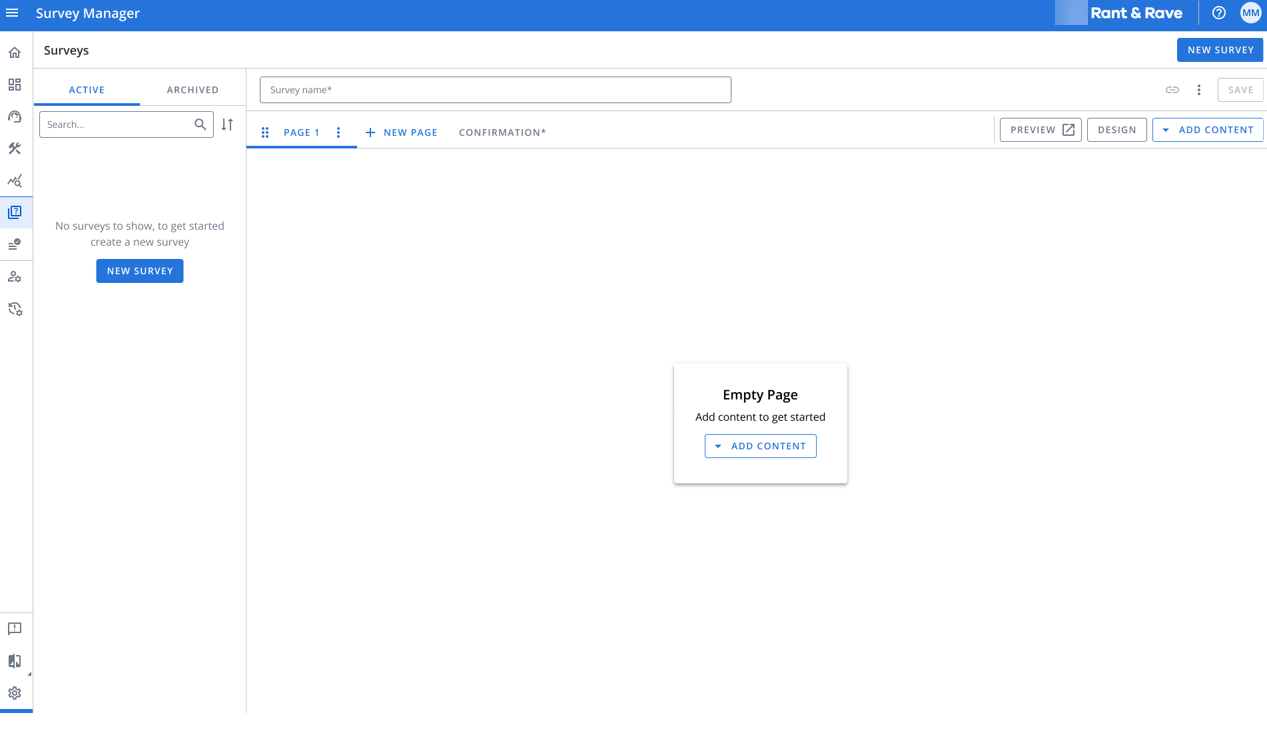
Make It Your Brand - Complete Design Control
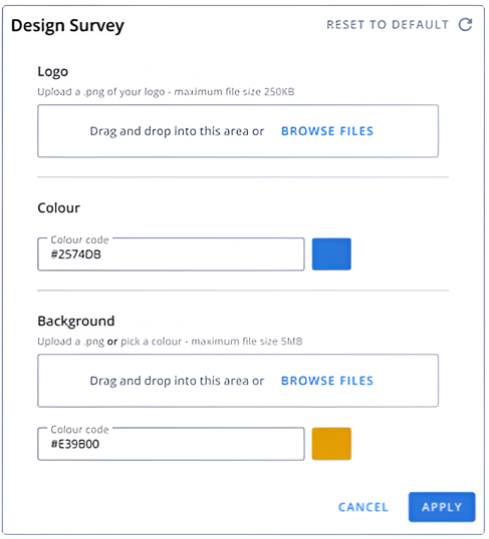
Customize your surveys to match your brand identity:
-
Upload your company logo.
-
Set brand colors using your HEX codes.
-
Add background images or colors.
-
Create a consistent experience across all touchpoints.
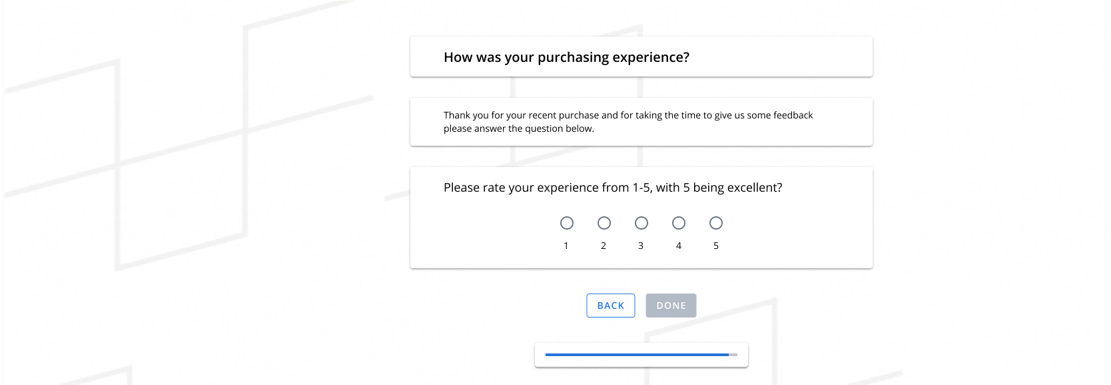
Preview Before You Publish- Test your surveys before sending them to customers
• See exactly what your respondents will experience.
• Test form validation and mandatory fields.
• Review on any device—mobile, tablet, or desktop.
• Make changes with confidence.
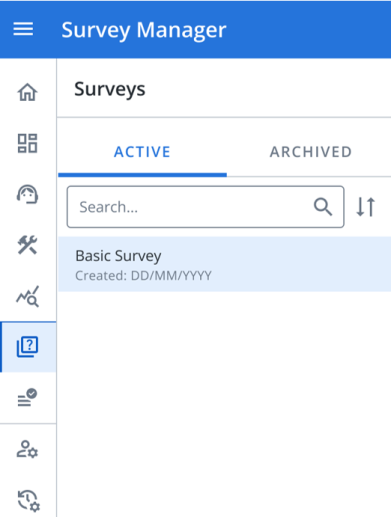
Manage Your Survey Library - Complete Lifecycle Control
Organize Efficiently
• View all your surveys in one place.
• Search by survey name.
• Sort by creation date.
• Toggle between Active and Archived surveys.
Edit and Update
• Modify active surveys anytime.
• Reorder questions with drag-and-drop.
• Update branding and design.
Archive for Safekeeping
• Archive surveys you're not currently using.
• Restore archived surveys when needed.
• Archived surveys are protected from accidental editing.
Duplicate to Save Time
• Clone existing surveys with one click.
• Reuse successful survey templates.
• Customize duplicates for different campaigns.
Permanent Deletion
• Delete archived surveys when no longer needed.
• Confirmation dialog prevents accidents.
• Active surveys are protected from deletion.
Deliver Seamless Experiences For Your Customers
Your survey respondents will enjoy:
• Mobile-Friendly Design: Perfect experience on any device.
• Clear Progress Indicators: Always know how far they've come.
• Smart Validation: Helpful error messages for email and phone fields.
• Easy Navigation: Back buttons to review and change answers.
• Professional Thank-You Page: Customizable confirmation message.
Reliable Feedback Capture
Behind the scenes, we ensure every response is captured:
• Automatic retry if connection is lost.
• No feedback is ever lost due to technical issues.
• Responses sync seamlessly to your Rant & Rave dashboard.
Getting Started - Quick Start Guide
Step 1: Create Your Survey
1. Click New Survey in Survey Manager.
2. Add pages and drag content blocks onto each page.
3. Link questions to your customer data fields.
4. Add your confirmation message.
Step 2: Customize Your Design
1. Click the Design button.
2. Upload your logo and background.
3. Set your brand colours.
4. Click Apply to save.
Step 3: Test and Deploy
1. Click Preview to test your survey.
2. Verify all questions and branding.
3. Save your survey.
4. Copy the survey link and share with customers.
What's Included in Phase 1
-
Score-based questions (NPS, satisfaction ratings).
-
Open-text verbatim feedback.
-
Multi-page surveys.
-
Custom branding and design.
-
Survey preview and testing.
-
Complete survey management (create, edit, archive, delete, duplicate).
-
Mobile-responsive survey delivery.
-
Search and sort capabilities.
Coming Soon in Phase 2
-
Conditional Logic: Show or hide questions based on previous answers.
-
Decision Trees: Create dynamic survey paths.
-
Advanced Question Types: Matrix questions, ranking, and more.
-
Pre-Built Templates: Start with proven survey designs.
-
Colour Picker: Visual colour selection tool.
Best Practices
Survey Design Tips:
• Keep surveys concise—aim for 5-7 questions.
• Use clear, simple language.
• Test on mobile devices before deploying.
• Include a progress bar for multi-page surveys.
• Write a warm, appreciative confirmation message.
Managing Your Survey Library:
• Use descriptive survey names for easy searching.
• Archive completed campaigns to keep your active list clean.
• Duplicate successful surveys to maintain consistency.
• Preview changes before saving updates.
Why This Matters
Faster Time to Market
Deploy new surveys in hours, not days. No need to wait for technical support.
Greater Control
Make changes on your schedule. Test different approaches quickly.
Cost Efficiency
Reduce support tickets and streamline your feedback programs.
Consistent Branding
Ensure every customer touchpoint reflects your brand identity.
Improved Response Rates
Mobile-optimized surveys meet customers where they are.